Syzygy is an astronomy term: three celestial bodies lining up in a near-straight line under gravity. We chose the name to stake out a bet that when independent devices and data streams align, the result is worth more than the sum of its parts.
As a product, that bet compresses into one sentence: let personal digital information flow freely, be understood, be organized, and finally be put to use by AI. It sounds distant until you look at how people actually work today. You see a paragraph on your phone, send it to yourself over a chat app, copy it on your computer, paste it into a document, and file the source somewhere you will never find again. Hours disappear into moving things between apps and hunting for them afterwards.
Syzygy started in January 2026 with a clear stance: this is not a clipboard manager with extra features. The clipboard is the highest-frequency, lowest-friction entrance into a personal workflow, so that is where we start. The product's real job is to carry your data through an entire lifecycle (capture, flow, sync, understanding, classification, retention, retrieval, reuse) until AI can act on it.
The order is not swappable: data, then context, then AI, then agents
The single most important line in our roadmap is the ordering. AI capability is cheap to attach. It's an API call. Reliable data infrastructure, a sync engine, workspaces, and memory take years. We have all seen products built the other way around: AI features without a data foundation collapse into a chat window that answers whatever you manually upload, blind to everything you already have.
So the build order is fixed: data infrastructure → context infrastructure → AI infrastructure → agent infrastructure. Mapped onto what a user perceives, the product goes through four identities:
| Stage | Positioning | In one line |
|---|---|---|
| Stage 1 | Clipboard manager | A genuinely great clipboard |
| Stage 2 | Personal data sync | My data moves between devices on its own |
| Stage 3 | Personal workspace | Everything I collect converges, organizes, and gets used here |
| Stage 4 | Personal AI workspace | AI understands my digital world and does work with it |
The long-term plan runs through seven phases: Foundation, Clipboard, Data Flow, Workspace, AI Context, Agent, and Personal Memory. Once the chain is live, data movement becomes a loop:
flowchart LR
  A[Capture] --> B[Flow]
  B --> C[Workspace]
  C --> D[Context]
  D --> E[Memory]
  E --> F[AI understanding]
  F --> G[Agent execution]
  G --> H[Action]
  H --> A
Read plainly: every copy, save, and recording is input to the system; the system's output is an action back in your workflow, which becomes the next input.
Two planes advance in parallel. The data plane moves information; the intelligence plane makes sense of it. Clipboard, files, images, and voice belong to the first; AI, memory, and agents belong to the second; the personal workspace is where they meet. Layering has a practical benefit: each layer has its own acceptance bar (sync by cross-device success rate and latency, retrieval by search hits, AI by task completion), so the product never becomes "a bit of everything, great at nothing."
Where we are: the second identity is standing
Roadmaps read like wish lists, so start with what has shipped. 1.1.0 went out on August 31, 2026. Between then and September 26, 70 commits landed on main (32 feat, 17 refactor, 9 add, 5 fix), and all three new capability lines grew from zero inside that window: the real-time voice input chain, the local LLM runtime, and the prompt-and-skills system. The mechanics are covered in the 1.2.0 release notes.
The clipboard and data-management layer: a multi-format clipboard history with cross-device sync, dedicated workbenches for text, images, files, screenshots, SVG, and code, a text workbench with word count, whitespace cleanup, Base64 and JSON tools (text workbench), OCR and full-text search over screenshots and PDFs (search and OCR), tags and trash for organization (tags and trash), and preview popups plus a command palette for retrieval (preview and command palette).
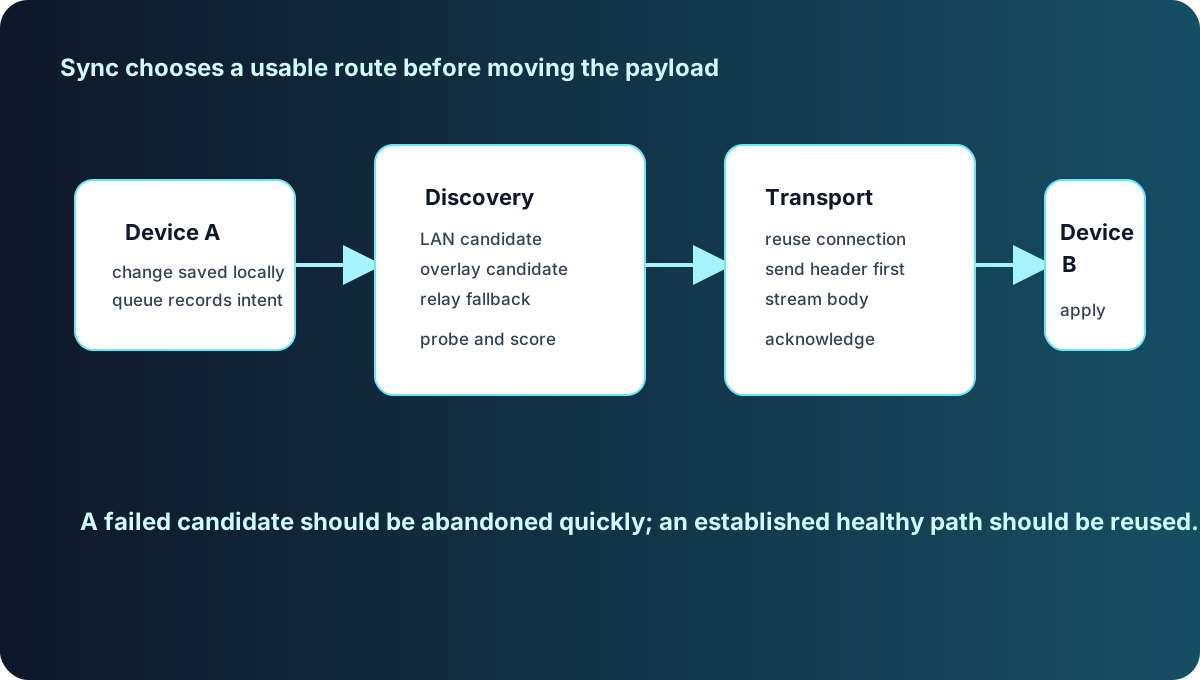
The sync layer: pairing establishes encrypted trust between devices; data prefers direct paths over LAN or NAT traversal and falls back to an encrypted relay when direct fails (pairing and sync). Files above 5 MB sync metadata first, and the receiving device decides whether to pull the full content, an on-demand policy that protects mobile storage.
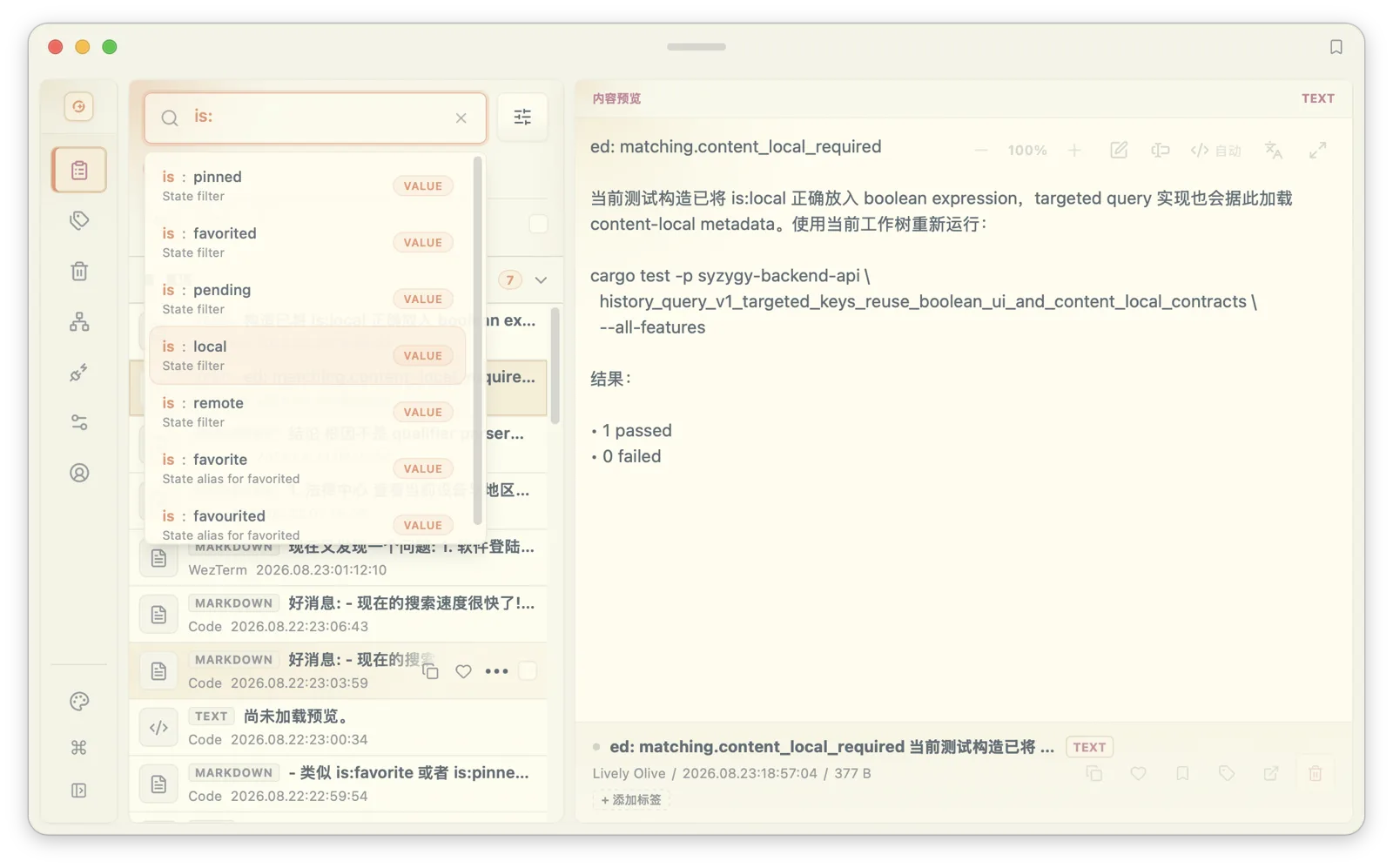
The context and AI layer: semantic vector retrieval fused with lexical search, local and remote embedding models behind one interface, and a local LLM loaded in-process from GGUF weights (Metal-accelerated on macOS) that serves an OpenAI-compatible endpoint bound to loopback only. Clipboard understanding and translation can run on cloud models or fully offline on local ones (local AI models). Prompt management now ships with built-in version control, and a skills registry is taking over extensibility (prompts and skills).
In the four-stage framing, Stages 1 and 2 are standing; the foundations of Stage 3 (workspace, retrieval, context pipelines) are moving in. The evidence is the direction of data flow: everything you copy can now be understood, organized, and reused across devices.
Inputs: the clipboard is only the first bus
Over a longer horizon the clipboard is one of several inputs. The planned input layer gathers four sources: the system clipboard, the keystroke stream from your input method, on-device voice dictation, and screenshots. Everything settles locally as append-only history, resident in the background, never interrupting what you are doing.
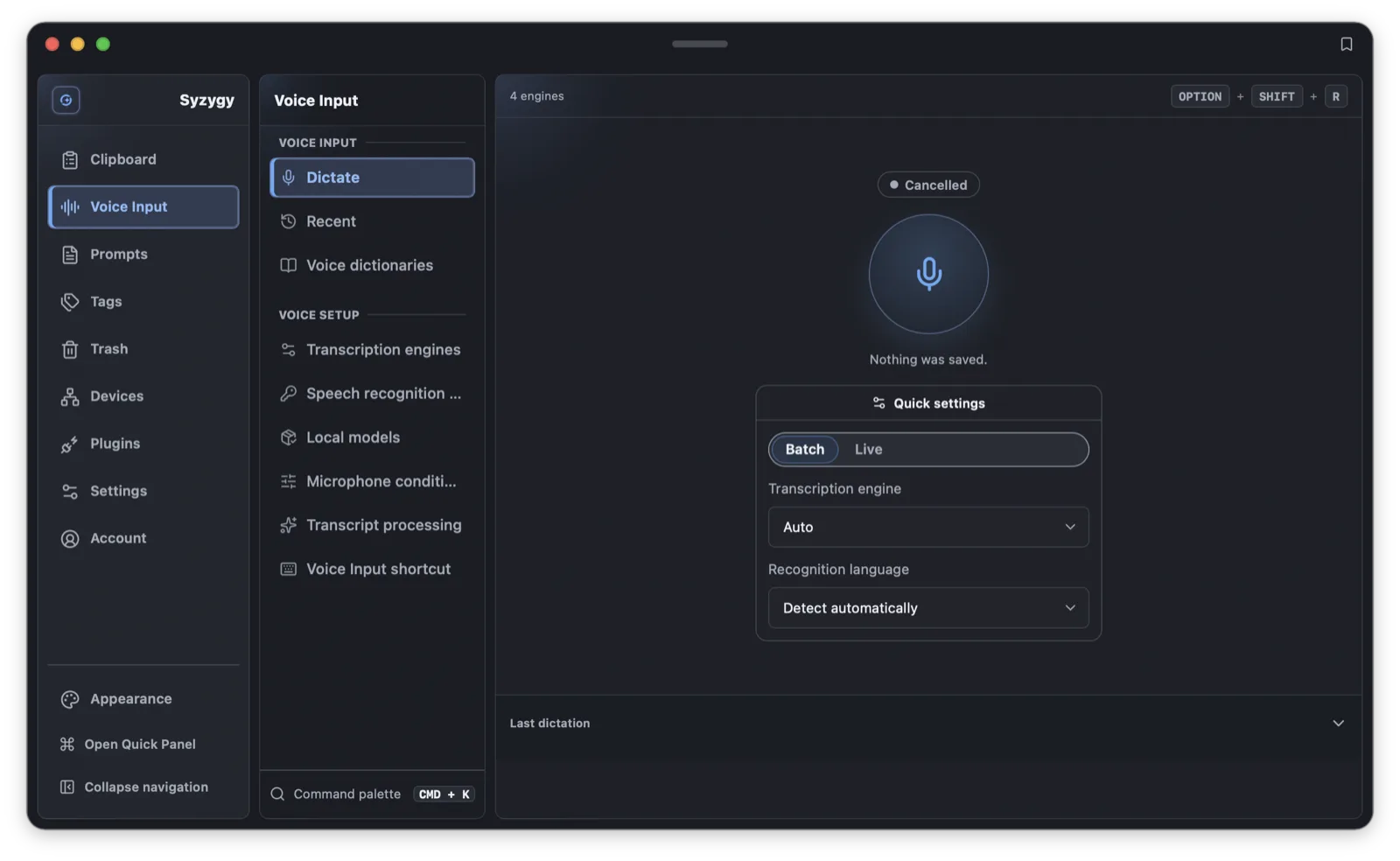
Voice has a four-step path: voice input; voice rewriting, summarizing, and translation; controlling Syzygy by voice; invoking agents by voice. 1.2.0 delivered the first step in its local form: Silero VAD streaming segmentation with a multi-engine recognition fallback, fully offline when configured that way. Saying "organize the three articles I just copied" and having it executed is where this road ends.
Screenshots get the same treatment: capture a web page and the system runs OCR, extracts text and URLs, recognizes code and tables, keeps the original image, and builds searchable text. A screenshot stops being a picture and becomes a Visual Resource. The shared abstraction underneath is the Resource model: text, images, files, screenshots, voice, links, and notes are types of one object with common metadata, tags, sync, and permission semantics. That abstraction, chosen on day one, is what decides whether the product can expand to new data types later.
Agents: integrate mature engines, contribute the data context
We have a deliberate position on agents: in the short and medium term, we do not build an agent engine. Desktop open-source agent projects have already matured planning, tool calling, and multi-model support. A second proven pattern is bridging established coding agents (codex, claude code, gemini, grok) and providing a unified management layer for providers, models, MCP, and skills on top.
Syzygy's place in that structure is precise: the agent's brain and execution engine come from mature open source; what we add is what nobody else has, your personal data context. Clipboard, file search, OCR, workspaces, and memory will be exposed to bridged agents as MCP tools. At generic Q&A we will not beat model vendors. At being an executor that understands what you copied and saved over the last month, the personal data layer is the decisive variable.
Three scenarios are picked to prove this out:
- Material to deck: "turn the AI-agent material I collected into a 15-page deck." The agent searches the workspace and clipboard history, deduplicates, summarizes key points, builds the outline, generates the file, and checks the result.
- Material to report: automatic clustering of recent saves, extracting core claims, finding conflicts and consensus, forming conclusions, writing the report.
- Clipboard as the AI input bus: copy a paragraph of English and get translation, rewriting, summary, explanation, tagging, and saving in place. The clipboard graduates from history log to the input channel of a personal AI.
The stronger the agent, the higher the cost of losing control, so a permission gradient is part of the design: read, suggest, preview, confirm, execute. Per tool, you choose auto, confirm-required, or blocked. Reading files can run free; deleting files and sending mail require confirmation; payments default to blocked. Autonomy expands with accumulated trust, matching the product philosophy of "AI proposes → user confirms → system executes → user corrects."
Memory and moats: the hardest part to copy away
Memory is the long-term moat, split into five kinds: episodic (what happened), semantic (what you know), preference (what you like), procedural (how you like things done), and project memory (the context of work in flight). Memory forms through human-in-the-loop cooperation: AI observes and proposes, you confirm, the preference sticks, similar operations run automatically next time. The first archive asks; the second archives by itself; the third adds tags. That is the mechanical meaning of "understands you better the more you use it."
The moat itself is five accumulating graphs: a data graph (what exists where), a context graph (what belongs to which project), a behavior graph (how you organize and search), an automation graph (how you get things done), and finally trust. The first four can be learned by any system. The fifth is the hardest to migrate: once software genuinely understands how you work, switching tools means rebuilding all of that understanding.
On competition, we concede two battlefields on purpose: we will not out-model ChatGPT, Claude, or Gemini, and we will not out-ecosystem Microsoft's Office. Syzygy's opportunity is the cross-platform, cross-device, cross-application personal data layer, the position that ecosystem-bound platforms are structurally bad at.
Measurement follows the same line. Beyond DAU and MAU we track how much data actually gets reused. Our north-star metric is the Useful Data Reuse Rate. Run the roadmap's own example: of 1,000 items a user produces, about 200 are revisited, 80 enter a workspace, 40 are used by AI, and 20 produce an actual outcome. On the AI side we watch the AI Action Completion Rate, that is, how many delegated tasks actually finish. Chat counts are not on the dashboard.
What we have not built, and why
Here is what is explicitly not delivered, grouped by reason.
Designed, not yet implemented. The agent execution layer and the memory layer both sit at Proposed status in the architecture docs and have not shipped. The memory layer's design has converged: a self-built Rust core with SQLite full-text and vector indexes plus a Markdown file mirror, with no cloud memory services and no Python memory runtimes. The agent canvas interaction design (dual conversation/canvas view, approval nodes, five-state execution visualization) is written down and waits for the data and context layers to mature.
Designed, timing not right. The data-flow rules engine is a set of user-defined rules like "images copied on my iPhone sync to the Mac" or "PDFs whose OCR contains Rust get tagged Rust." Rules depend on the Resource model and sync engine being rock solid, so this sits behind sync reliability. Team workspaces and private relay deployment are in the same bucket.
Waiting on external conditions. The iOS build is in App Store review. Cross-device validation of the voice chain with real microphones on Windows and Linux is planned and is a known boundary of 1.2.0.
The roadmap risk we take most seriously is feature bloat: cramming clipboard, sync, voice, screenshots, AI, and agents into one app yields a feature collection. The countermeasure is procedural: each layer reaches a verifiable depth before the next one opens. The second risk is AI privacy: clipboard data is intensely personal by nature, so we stay local-first, run local models alongside cloud ones, let users control which workspace data AI may read, and redact sensitive credentials locally.
Commercialization: free first, usage later
Commercialization runs on four stages, deliberately back-loaded. Today it is freemium: the free tier covers local clipboard features and basic search; cross-device sync follows device-role and Pro-seat rules, allowing a free phone to pair with a Pro PC within the device limits, while free PCs cannot pair; Pro unlocks unlimited history, more devices, advanced sync, file previews, and AI, with bring-your-own-key support so model choice stays yours. Stage two adds subscription plus AI usage billing so heavy agent use does not become unbounded cost. Stage three introduces Personal, Pro, and Team workspace tiers. Stage four bills agents on subscription plus execution credits.
One principle will not move: we will not break "your data belongs to you" to make money. No cloud upload, P2P direct connections, end-to-end encryption, local processing first: these are architecture, not pricing levers.
Next
Concrete near-term items, in order: app-store distribution on iOS and Android to remove the sideloading barrier; exposing the data space and memory natively as an MCP server with a built-in work-agent entry point; deploying low-latency encrypted relays to raise connection success across borders and strict NATs; and completing cross-device microphone validation plus more recognition engines for the voice chain.
The end state compresses into three verbs: Capture (everything you produce can enter Syzygy); Organize (the system understands and organizes it); Act (AI uses it to finish work). The ten-year version in one line: Syzygy wants to be the connection layer, the memory layer, and the execution layer of your digital world.
A note on method: Syzygy is led by one full-time independent developer on a human-in-the-loop, AI-assisted workflow. Requirements converge into written specs through multi-round alignment, AI executes, a human reviews architecture and code quality, automated tests guard the regression. The practice details live in the project's retrospective docs.
Frequently asked questions
What does Syzygy ultimately want to be?
A personal digital workspace that you own: clipboard entries, files, screenshots, and voice notes flow between devices on their own, get understood and organized, and are eventually used by AI to do real work. The clipboard is just the highest-frequency entrance.
Why did Syzygy build clipboard sync before AI?
Because the order is not swappable. AI can be wired in quickly, but reliable data infrastructure, sync, and context take years. An agent without a data and context layer degrades into a chat window.
When will Syzygy support agents?
The agent execution layer is designed but not shipped. The plan is to integrate mature open-source agent engines and bridge established coding agents; Syzygy's contribution is exposing your local data to them as MCP tools.