Clipboard history is a pile of fragmented, unorganized pieces. Most of the time, Win+V gives you only the latest entry; most third-party clipboard managers give you a reverse-chronological list with a prefix-match search box. At small counts, these are enough. Syzygy's free tier retains the most recent 100 entries for up to 30 days; as the list keeps growing into the hundreds and thousands, "I copied that" and "I can find that" stop being the same thing.
Last week's stack trace. A ticket number from three business days ago. A paragraph inside a chat screenshot. These were all copied before; how could they be unfindable? Each one is a different retrieval failure: digit strings get shredded by lexical search, terminology fails on wording drift, and images cannot be found again through text.
Syzygy treats retrieval as critical infrastructure and builds it as a core local engine: a tantivy index over the 5,000 most recent entries, a hybrid path that fuses lexical and vector rankings, a qualifier syntax for writing queries precisely, and local OCR that turns screenshots and PDFs into searchable text. This post walks through how the four parts are built, how they interact and reinforce each other, and what falls inside each part's own territory.
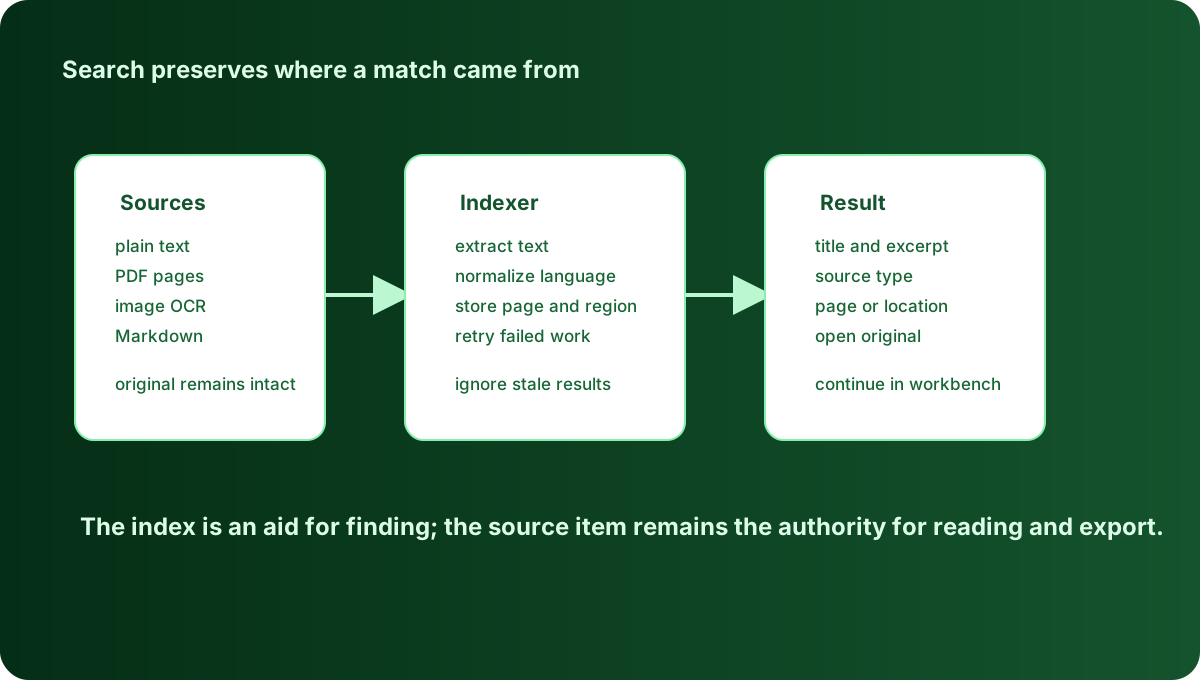
Text is the easiest thing to index: the basic local index
Clipboard content arrives in many shapes: plain text, HTML, images, files. Searching raw bytes is meaningless, so Syzygy runs a text pass at capture time, extracting the readable, useful information and turning every format into indexable text. Plain text is decoded directly (UTF-8 and UTF-16 both handled); HTML is stripped down to its body; PDFs go through text-layer extraction; images and PDF pages without a text layer are handed to local OCR, and the recognized text and similar output are then folded into the index.
The indexer runs in the background, keeping pace with capture (the capture poll ticks every 150 milliseconds, so copied content lands almost instantly) and rolling over the most recent 5,000 entries, with a per-entry index budget (the maximum bytes that can be recognized and processed) of 512KB on the body text. Those two settings draw the range and set the boundary of what the index can do: 5,000 entries is a rolling window of weeks to months for a heavy clipboard user, and 512KB means an entire long document or code file fits into the index in full, while a 20MB log file is better opened on demand than resident in an index.
Bodies are not the only thing indexed. Every entry's metadata (the information describing the entry's attributes: where it came from, what type it is, when it was created) goes in alongside: source app, tags, originating device (peer), content type, and creation time. That is the data foundation for the qualifiers later in this post, and it makes "which device copied this" and "from which app" queryable dimensions.
Multi-file entries get an explicit policy: the file names themselves go straight into the index, and whitelisted file types (md, txt, json, log, pdf, plus common code and image formats by default) are indexed by content; image contents are backfilled once models are ready, without blocking the rest.
The whole index lives on local disk. The allow_remote setting is off by default: it controls whether semantic indexing may call a remote embedding service; while it stays off, embedding computation and queries all happen on this machine, and body content is never sent to any server. The cross-device dimension works the same way: paired devices sync the records themselves, but search always executes locally, and the index is never shipped off to a remote machine to run.
flowchart LR
  A[Clipboard entry] --> B["Capture and store<br/>150ms polling"]
  B --> C["Local index<br/>body + metadata<br/>up to 5000 entries / 512KB each"]
  C --> D[Lexical query]
  C --> E[Vector search]
  D --> F["RRF rank fusion"]
  E --> F
  C --> G["Qualifier filters<br/>kind / tag / peer / date"]
G --> FHow lexical search behaves: multi-word, exact, and phrase boosts
For ordinary multi-word queries, Syzygy requires every term to match: search for paddle ocr config and all three terms must appear in the document, or it is out. This hard filter avoids a page of half-hits that share one word with your query.
On top of the filter sit two boosts: an exact whole-term hit multiplies weight by 2.0, and terms appearing in their original order as a phrase multiply by 4.0. Searching recall memory matches anything containing both words, but a document containing the exact phrase "recall memory" ranks ahead. If you work support and copy dozens of ticket numbers a day, strings like that go through exact-term matching with phrase weighting on top, and the hit is far more direct than anything fuzzy.
Two kinds of content get special treatment: pure digit strings and hexadecimal strings of eight characters or more go exact-only. The ticket number 88231 is never tokenized apart, and the API key a3f9c2d1... is never fuzzy-matched into its neighbors, and that is exactly the outcome we want.
The moment your query contains explicit syntax (AND, OR, NOT, quoted phrases, the minus prefix, parentheses, or any field qualifier), Syzygy hands the query to tantivy's native parser in full and drops the blended strategy. If you want finer-grained search with advanced boolean logic, the software supports it; at the same time, users who don't know or don't want to learn the syntax are perfectly served by the default strategy.
Lexical-only or vector-only search both miss results: fusing ranks with RRF
You remember "that error," but the record says "error occurred"; you remember "meeting notes," but the tag was "meeting minutes." Most of the time wording just doesn't line up, and a lexical-only system misses right there.
The other way around, a vector-only system cannot handle exact identifiers either: ticket numbers, API keys, and hex hashes get folded by embeddings into a semantic space where they blur into lookalike strings, and lexical search hits them dead-on. The two paths have complementary strengths, and dropping either one is a bet.
Syzygy runs both and merges the rankings with Reciprocal Rank Fusion (RRF). The mechanism is plain: each list credits every document it contains with 1/(k + rank) points, k is 60, and the sums are re-sorted. A document ranked first on one list earns 1/61 ≈ 0.0164; ranked first on both, 0.0328. A document ranked 10th on both lists earns 2/70 ≈ 0.0286, comfortably ahead of one ranked 3rd on a single list (1/63 ≈ 0.0159). That is what k=60 is for: it flattens the head of any single list so that documents endorsed by both sides rise.
Why fuse ranks instead of scores? Because BM25 scores and cosine similarities are not on a shared scale, and adding them directly means hand-tuning weights. Ranks are scale-free; RRF reads positions only, so the two retrieval paths need no calibration against each other. It is the standard trick for exactly this reason.
The fusion also degrades usefully. If one side is unavailable (say, the local embedding model has not finished downloading), the result is simply the other side's ordering; the feature does not break. And metadata tokens never reach the embedder: vectors are computed over body projections only, so the system always knows which half of the index matched your query.
The privacy boundary is built into the fusion layer: items recalled only semantically whose content hits a masking rule never enter the results. A lexical hit means the text was visible in full anyway; semantic recall could "guess" its way into masked content, and that path is cut deliberately.
If you are a researcher who transcribed a quote a month ago and remembers only the gist plus two or three keywords, lexical matches the keywords, vectors match the gist, and the passage endorsed by both surfaces to the top.
Qualifiers: turning "I roughly remember" into a concrete query
Free-text search is a probability game. Qualifiers turn it into a condition query. Syzygy's search box supports six core qualifiers, each with aliases and negation:
kind:by content type: text, html, image, files, plus two text-derived virtual kinds, link and color (type:is an alias;-kind:imageexcludes images)tag:by tag; multiple tags are an AND, meaning all of themis:by state: pinned, favorited, pending, local, remotesource:by source app (app:is an alias)peer:by originating device (origin:anddevice:are aliases)date:by creation time: today, yesterday, 7d, 30d, plus exact dates and ranges (>=2026-09-01,2026-09-01..2026-09-07)
Dates generate tokens at three granularities in the index (year, year-month, day), so a coarse condition like date:2026-09 is a single match, not thirty expanded dates.
As you type, the search box suggests: qualifier keys, valid values for each key, and candidate pools drawn from your actual data. tag: lists the tags you really use; source: lists the apps you really copy from; values containing spaces are quoted automatically. You don't need to memorize the grammar; type half a token and pick.
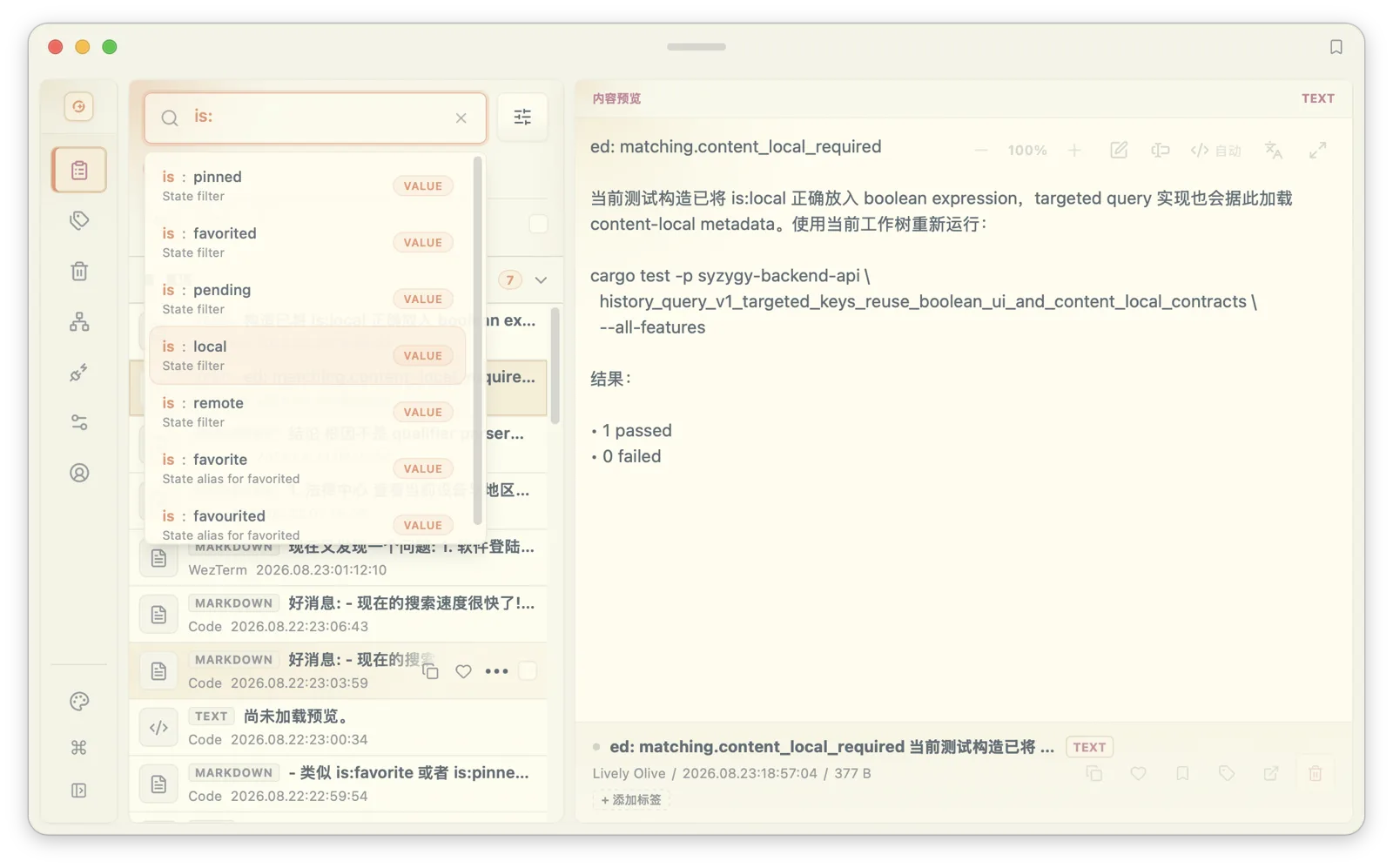
Composed, queries get specific: source:chrome date:7d kind:text error means "text copied from Chrome in the last week that mentions error." If you are a developer debugging an issue, narrowing to your IDE and terminal beats scrolling one long timeline; if you run marketing, tag:copywriting is:pinned pulls up exactly the pinned drafts.
Finding is half the job; pasting is the other. On macOS, Option+Shift+V summons the quick panel, arrow keys move through it, Shift+Right opens the full preview, and from the preview Cmd/Ctrl+O runs OCR on an image, Cmd/Ctrl+T translates, Cmd/Ctrl+E opens the editor. Pinned entries paste directly with Ctrl+Option plus digits 0 through 9, so a frequently used reply template never needs the main window at all.
Text in screenshots: three OCR trade-offs
An image is only searchable if it has text, which makes OCR part of the search pipeline rather than a button on the preview. The pipeline involves three trade-offs.
Resolution first. Before recognition, the image's longest side is scaled down to 1,600 pixels (adjustable between 256 and 4,096). Phone screenshots sit near that size naturally; desktop screenshots are usually wider. Scaling too small loses small type, and not scaling makes recognition slow and memory-hungry on large images. 1,600 is the compromise: on a 4,000-pixel-wide desktop screenshot, body text remains legible after the scale-down. Recognition boxes are projected back to source coordinates, so every block you see in the preview corresponds to a position on the original image.
The engine chain next. The default chain is mixed: run the local Paddle OCR models first (detection, recognition, and charset artifacts from a checksum-verified public catalog, placed automatically on first use), and fall back to the platform's system engine on failure. You can pin local-only, system-only, or wire in a tesseract command line. Engines stay offline by default, and automatic indexing never issues a single request to a remote vision service; only when you manually trigger vision OCR on a specific item might your own configured account be involved.
Caching last. Recognition results are cached by content hash, and the cache key carries the engine chain, language hint, max_px, and purpose. The same screenshot is never recognized twice; change max_px or swap engines and the key changes, so stale results are never served. There are two distinct purposes: the preview's OCR button returns coordinates for line-by-line re-pasting, while indexing uses a separate recall purpose, and the two never pollute each other's caches.
One more distinction that is easy to miss: "recognized to empty text" and "recognition failed" are different states. An image with genuinely no text is a completed observation with an empty result; a missing model or a crashed engine is a failure and is never recorded as "recognized, no text." This distinction drives retry and caching behavior, and it makes the judgment "this image has no text" itself trustworthy.
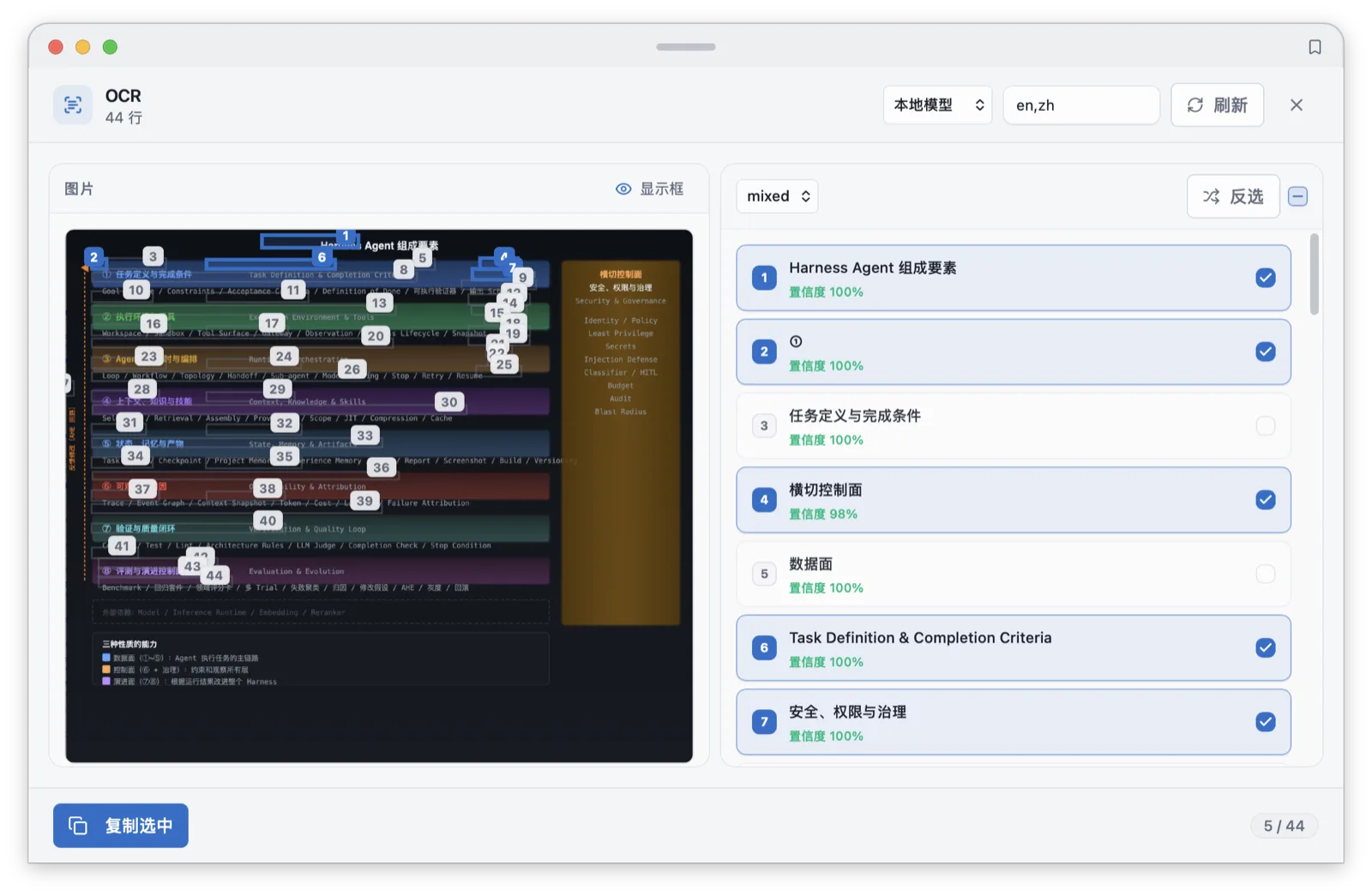
If you are a student or researcher photographing book pages, lecture slides, or whiteboards, every screenshot in your clipboard becomes searchable text; six months later, one remembered term pulls the whiteboard photo back out.
PDFs: a 64-page budget and two-layer extraction
Copy a PDF onto the clipboard and Syzygy processes it in two layers. The first extracts the text layer: wherever the PDF carries real text, extraction is fast and exact, page by page, capped at 64 pages. The second handles the empty pages: scanned pages have no text layer, so Syzygy renders them into images (scaled with the same max_px) and runs OCR, filling the recognized text back into the corresponding pages.
Each layer records its provenance: whether a matched passage came from the PDF's original text layer or from OCR is on record. Budget exhaustion is reported honestly: how many pages were read, how many exist, whether the budget truncated the work all return with the result. There is no state that looks complete but isn't. The whole PDF's processing result is cached by content hash plus page budget, so the same file never goes through a second OCR pass.
The 64-page cap covers the overwhelming majority of papers, contracts, and technical manuals; longer books belong in a dedicated reader. Together with a 32MB local read ceiling, the indexer never stalls on one giant copied item. If you are in legal or procurement, a contract PDF goes onto the clipboard once, and afterwards a clause keyword takes you straight to the page.
The privacy line: detect first, then decide
Stronger search means "findable" and "safe to see" have to be designed together. Syzygy ships with sensitive-content detection on by default: 12 built-in rule types covering ID numbers, phone numbers, one-time passwords, emails, bank cards (validated with a Luhn check), API keys, activation codes, and five Web3 categories: EVM addresses, Bitcoin addresses, EVM private keys, Bitcoin private keys, and BIP39 mnemonics. Beyond the built-ins you can add custom regexes and configure per-app capture deny lists, so a password manager's content never enters history at all.
What happens on a hit is split across two independent switches: masking is on by default, and blocking sync is off by default. The default behavior is "you can see it, but the content is masked"; whether it may sync to your other devices is your call, made explicitly.
We cover this in a search post because the two are one system: search makes three-year-old clipboard content retrievable in a second, including a password you copied three years ago. Detection rules existing before retrieval is the safe ordering.
What you copied, you should be able to find
Four layers, each owning one job: text projection decides what is indexable, 5,000 entries and 512KB set the window, RRF decides how the two rankings merge, and qualifiers plus OCR turn vague memory into precise query conditions. All of it runs on your machine; that is the starting point of the design, not a retrofit.
If you have just installed Syzygy: sign in, grant the macOS accessibility permission in settings, copy normally for half an hour to let the index fill up, then type kind:image and pick a screenshot to watch OCR feed search, and finally play with date:today source: plus your usual browser. The full setup walkthrough is in the install and first-run guide; what happens to each content type is in the clipboard content types tour; organizing what the index finds, with tags and trash, is in tags, trash, and clipboard organization.
The longer a clipboard tool lives, the more it resembles a small search engine. The local embedding model behind the semantic half shares the same local inference base as the local LLMs introduced in 1.2.0; that evolution is tracked in the local models workbench. Syzygy's route is to make the local parts solid first and keep every network capability behind an explicit switch.
Frequently asked questions
Can screenshots in my clipboard history be searched?
Yes. Syzygy runs OCR locally on images and feeds the recognized text into the search index alongside the image itself. Search for a keyword from the screenshot, or narrow the scope with the kind:image qualifier. Recognition runs on local models by default, with no network involved.
How much clipboard history does the search index cover?
The index covers up to the 5,000 most recent clipboard entries, with up to 512KB of body text per entry. The free tier retains 100 entries for up to 30 days; records synced from paired devices are indexed too. The actual indexed volume depends on what your history retains.
Does semantic search need an internet connection or a paid plan?
No. The semantic half runs on a local embedding model, and both indexing and querying happen on your machine. Syzygy also supports remote embeddings if you explicitly authorize them in settings, but that is opt-in and off by default.
Will content with phone numbers or card numbers show up in search and sync?
Syzygy ships with sensitive-content detection on by default, covering 12 rule types including ID numbers, phone numbers, OTPs, emails, bank cards, and API keys. Items that hit a masking rule are excluded from semantic-only recall, and syncing them to other devices is controlled by a separate switch.