You receive a .docx from a colleague, right-click, copy. In that half second, the system clipboard holds more than "a file": a file reference, possibly a thumbnail, the source app's trail. In another scenario, copying a chart-laden web page puts two formats into the clipboard at once, HTML and plain text. The first test for any clipboard manager starts right here: what does it decide the copied thing is?
"Supports images and files" is the depth most tool documentation reaches. That phrasing skips the questions that actually shape the experience: is a stored image bytes or pixels, does a file travel whole or as a summary, and when an HTML snippet goes to a chat app versus a code editor, which copy travels where. The answers are where clipboard managers really differ, and where this article lives.
Syzygy's answer is a content plan. Every entry is first recognized into a definite type family, and it carries a manifest that travels with its info summary: type, text, preview choice, available capabilities, size and evidence. Preview, edit, translate, OCR, and export all dispatch from that manifest, and an entry can surface as a summary before its body has moved anywhere.
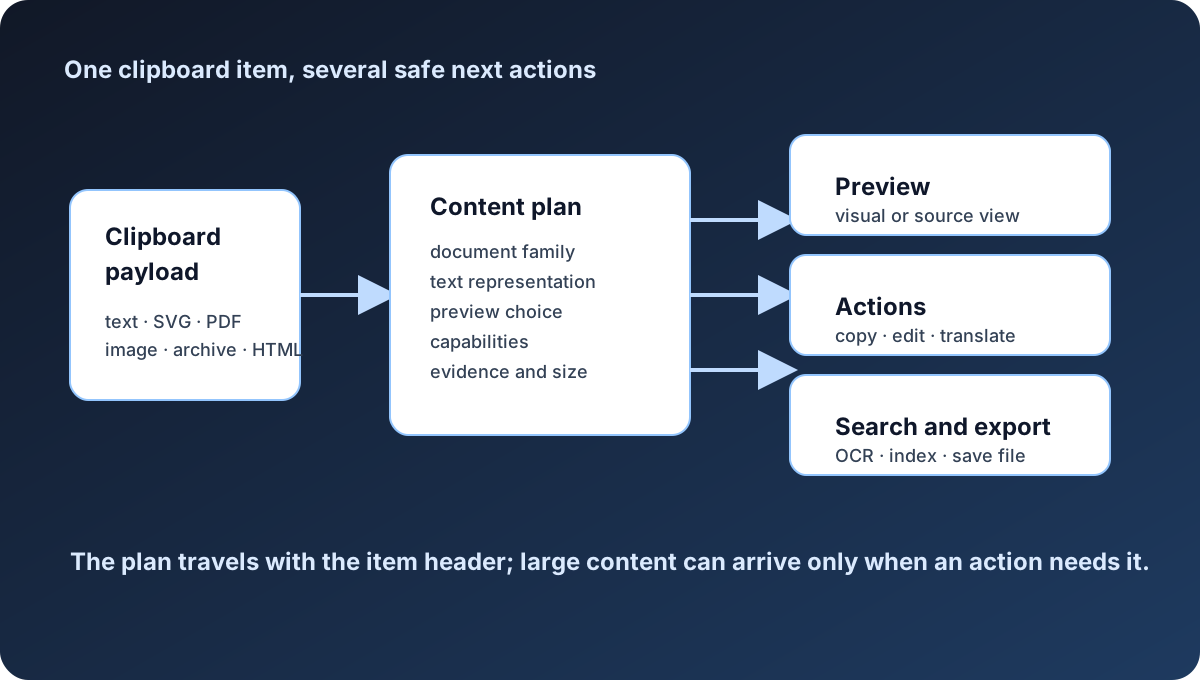
This article walks four representative payloads end to end: a DOCX, an HTML snippet, a screenshot, and plain text. Once the mechanics are clear, the boundary of each type speaks for itself.
One copy always carries more than one format
The OS clipboard is layered by design. On Windows a single copy can attach plain text, HTML, and file references simultaneously; macOS works the same way. The source app decides what to put in, and the pasting app picks what to take: the same paragraph pastes into a plain-text editor with every format stripped, and into a rich-text editor with bold and links intact. Most text-only clipboard managers pick a single format at capture time and drop the rest, after which the only way back is returning to the source app and copying again.
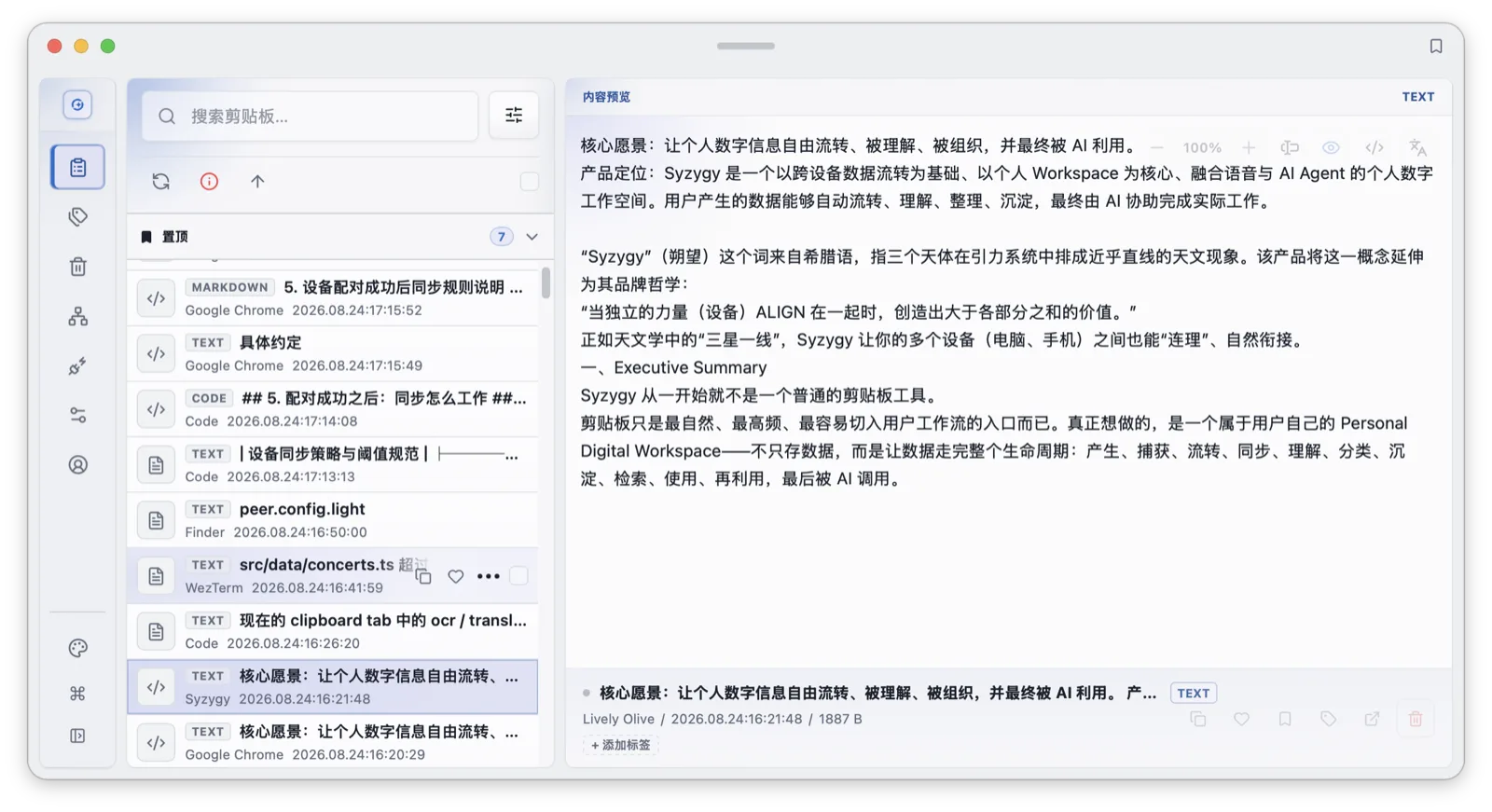
Syzygy normalizes what it captures into seven internal types: plain text, HTML, three image kinds (generic, PNG, JPEG), full files, and deferred files. The presentation and search layers then fold those into four user-facing categories: text, html, image, and files. Folding down to just four user-visible categories is deliberate. You should not need to know how PNG and JPEG differ from a search perspective to filter every image at once with kind:image; the wire-level distinctions between three image kinds belong to the protocol, and the user does not need to care about those details.
The info summary arrives before the content
Every clipboard entry in Syzygy has two layers: an info summary and a body. The info summary carries the source device ID, a sequence number, the type, a content hash, a byte length, and a timestamp, plus an Ed25519 signature so the receiving end can verify the summary has not been tampered with. File entries add a file listing covering count and size.
The body travels encrypted. Payloads use XChaCha20-Poly1305 stream encryption, and ciphertext is content-addressed: identical bytes exist once in storage, with the content hash serving as both identity and dedup key. For clipboard data, the most sensitive part, the body itself, never sits on disk in plaintext on any device. Deduplication is part of the software's job: copy the same sentence twice and storage holds one ciphertext blob while the history list shows two entries, each identified by its own device and sequence number. The receiving device can also verify the body against the hash in the summary, and corruption or tampering in transit is surfaced clearly to the user in the app.
Sync moves the summary ahead of the body. The other end learns "something arrived," with type, preview, and size attached, before any decision about the body. The rule holds at both extremes: a 100-byte verification code materializes almost instantly; a 200 MB video can live in summary form indefinitely, waiting for you to decide.
Thresholds start working at capture. Text beyond 20 MB converts into a file entry so one giant paste cannot bloat the history list; files beyond the deferred threshold (50 MB by default) register metadata only, with no immediate byte shuffling. The sync layer adds its own thresholds per paired device: realtime mode auto-syncs full content up to 50 MB by default, on-demand mode up to 5 MB, both adjustable from 0 to 200 MB.
flowchart LR
  A[Platform clipboard formats] --> B[Save history entry]
  B --> C[Detect the content family]
  C --> D[Build the content plan]
  D --> E{Are the content blocks complete?}
  E -- No --> F[Show waiting state, keep metadata]
  E -- Yes --> G[Compute preview and capabilities]
  F --> H[Background download and verify]
  H --> G
G --> I[Copy, export, search, or edit]How a DOCX behaves inside the app
Back to that .docx. The moment you copy it, Syzygy creates a file entry whose summary records the content hash and the file listing; the source app and source device land in metadata too.
Sync: the summary reaches the paired device first. Pairing is a prerequisite: initiation from the peers screen, then mutual local trust confirmed on both ends. Free-to-free pairing is blocked. That layer has nothing to do with content types, but it decides whether the DOCX summary departs at all. If the receiving device runs realtime mode and the file is under threshold, the body follows automatically. Over threshold (an 80 MB bundle of contract scans, say), the receiving list shows a summary with type, preview, and size. With multiple devices, priority participates: the work machine, set high, is synced and aligned first.
Preview: opening the entry on desktop renders the .docx. Worth noting: .docx, .xlsx, .pptx, and .zip previews are Pro/Team capabilities, and the free tier shows a clear prompt naming what is missing and where to enable it. PDF and image previews are available to all users, no restrictions. Previews themselves carry a size cap (about 26 MB by default); beyond it, nothing renders half-broken, and the cap is adjustable in settings.
Search: text extraction for file entries follows a format allowlist. By default it covers .md, .txt, .json, .html, .css, .js, .ts, .pdf, and common image formats. .docx is not on the list, so its body text never enters the index; you find it by filename and metadata. PDF takes the other road: the text layer is extracted directly within a 64-page budget, scanned pages route through OCR, and results are cached by content hash, so the same PDF never computes twice.
Download: the other end clicks the download button in the app, the transfer queues in the background, failures retry automatically, and the verdict is whether the complete file landed locally. A single failed-transfer toast is not the verdict; brief failures that self-recover are normal transport retries.
Beyond preview there is a third way to consume the entry: pop it out into a floating window, adjust opacity, keep it on top. Pinning a contract to the edge of the screen while you copy numbers out of it beats scrolling through history.
The three bodies of one HTML snippet
HTML is the clipboard's most layered type. Copy web content and HTML and plain text coexist; copy a component from Figma and the clipboard holds HTML with a bitmap and proprietary markers; copy an SVG snippet and the bytes are text, but what the user sees is a picture.
Copy a report section with a chart: pasting into notes calls for readable plain text, pasting into a blog editor calls for HTML with formatting intact. Syzygy keeps both, previewing with the HTML and falling back to derived text when clean words are what you need.
Take one bold line, "Release date: September 27". The browser puts two copies into the clipboard:
HTML: <b>Release date: September 27</b>
Plain text: Release date: September 27
Paste into a rich-text editor and the bold survives; paste into a code editor and what gets used is the plain-text copy.
Every HTML entry goes through a format analysis that picks one definite preview kind: standalone SVG becomes standard SVG; a bitmap representation becomes standard bitmap; a detected Figma payload becomes an approximate Figma preview; everything else is opaque HTML. Preview dispatches accordingly: SVG and Figma content render into a visible image, so you can copy-as-image straight into any chat app, or switch to source mode for raw code. One copy, two destinations, no interference.
The text fallback is an explicit policy with two branches. Text-bearing HTML derives normalized visible text for the clean-text path. Image-only HTML (a fragment that is just one img tag) keeps its original markup. Here is one line:
<img src="https://example.com/sales-chart.png" alt="2026 sales trend">
Deriving text from the tag yields nothing but the alt attribute, and every number in the chart is gone; that would silently replace the user's clipboard content with one sentence. So this kind of HTML keeps its source markup.
Infrastructure may transform the stored HTML format later, for example by embedding remote image bytes so the entry still renders offline. The transformation never rewrites the fallback policy; the text-derivation rule travels with the original entry.
The fourth kind deserves honesty: opaque HTML is the normal case for desktop apps, whose homegrown HTML dialects are uncountable. Syzygy does not pretend to render all of them and ships conservative handling with a preview hint instead. Knowing what you cannot render is part of recognition too.
Images: bytes, pixel caps, and the OCR cache
Clipboard images arrive as packed pixel data. Capture validates width, height, and byte-length consistency; anything with a side over 32,768 pixels or a total area over 64 megapixels is rejected outright, so a malformed image with a forged header cannot drag down the pipeline. Images beyond 20 MB are managed as file entries.
OCR is the default capability for image entries, in three stages. Before recognition, the image is downscaled to a default ceiling of 1,600 pixels to bound the compute. By default, recognition walks the fallback chain (mixed, local, system): mixed runs the local model before the system engine; local binds a bundled Paddle model set covering detection, recognition, and charset; system calls the OS recognizer; a tesseract CLI remains an option. Remote recognition is off by default.
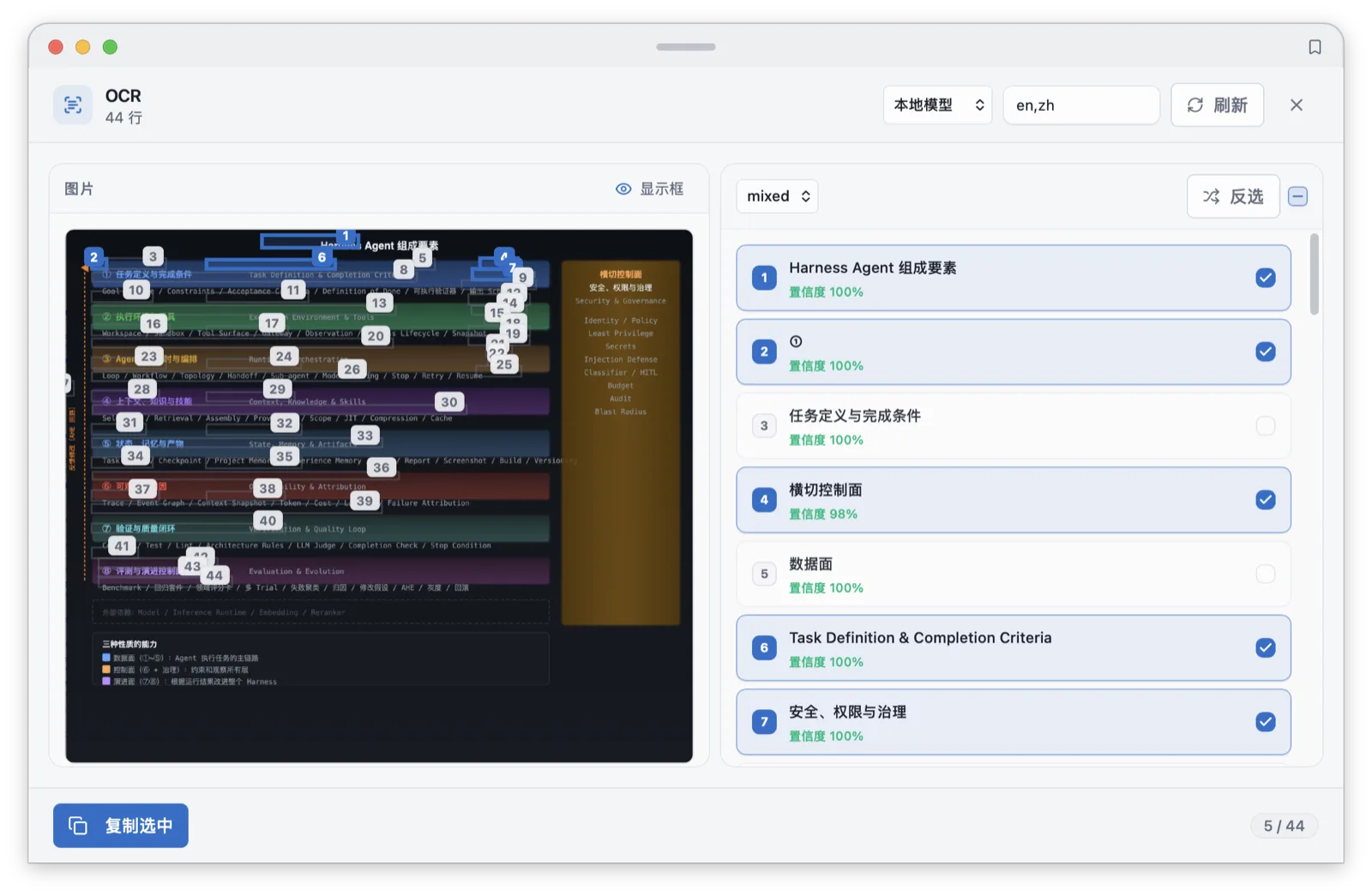
Results are cached by content hash. The same screenshot forwarded ten times through a group chat is OCR'd once. The recognized text enters the search index with its provenance marked, which makes screenshots findable by words, with qualifiers riding along: kind:image narrows to images, source:chrome to the source app, date:2026-09 to a month. The index caps at 5,000 entries by default with 512 KB of indexable content per item.
Screenshots have a third use: pop one out into a floating window, adjust opacity, keep it on top. Transcribing settings from a screenshot someone sent you goes faster with the image pinned to the screen edge than with repeated trips through history.
What the quick panel consumes from the plan
Preview is not only the thumbnail in the main list. The quick panel opens with Option+Shift+V, and the same content plan keeps working inside it: arrows move, Shift+Space expands or collapses the preview, Shift+Right enters the full viewer, Esc leaves. In a file entry holding multiple files, Cmd/Ctrl+Up/Down steps between them.
The panel itself has configuration room: opacity, glass blur, whether it follows the cursor's screen, and a five-minute retention after hide so you can come back mid-decision. Those settings control how much the preview layer interrupts you; the content plan controls what the preview layer can see. The two layers stay out of each other's way.
Actions dispatch from the manifest as well. OCR, translate, and edit each carry a direct shortcut in the panel (Cmd/Ctrl+O, T, E), and capability follows type: an image entry offers OCR, a text entry offers the workbench rules, a file entry defaults to preview and download. The mapping between entry type and available action comes from the content plan, not from your memory.
Plain text is not "plain"
The least glamorous type has the most edges. The decode layer handles UTF-8 and UTF-16 BOMs, truncating invalid bytes at the last legal boundary, which keeps unexpected input from crashing the app or turning content into mojibake. At the type-detection layer there is also a heuristic probe for binary content: content with NUL bytes or control characters is classified unsupported rather than force-converted to text, because indexing binaries as text fills search results with noise.
Processing concentrates in the text workbench, with 16 built-in rules in four groups: cleanup (collapse spaces, remove line breaks, deduplicate lines, that last one a favorite for rosters pasted from spreadsheets), casing (upper, lower, capitalize), encoding (URL and Base64 encode/decode, JSON pretty and compact, which turns a compressed API response readable in one keypress), and counting (words, lines, characters). The workbench also edits directly, with search and batch replace on the entry itself, no detour back to the source app.
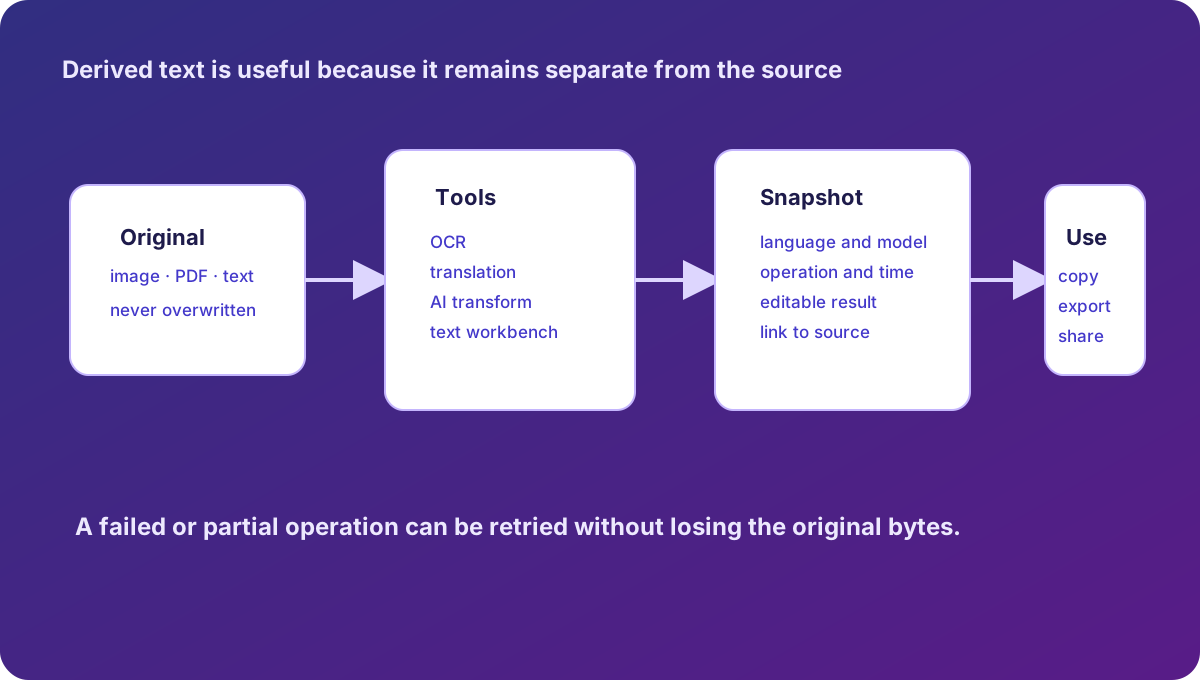
A processed result becomes a new entry; the original stays in history. The device also records where the new entry came from: which entry and which rule produced it. That record stays local and is never broadcast with sync.
Detection order, and the cost of folding
A copied piece of content passes four checks before its type is settled. First, bytes: PDF magic numbers and image byte sniffing run before any filename is consulted, so a file renamed in the browser downloads as what it really is, and an executable disguised as .jpg does not pass. Second, extension: a known list covering pdf, png, jpg, jpeg, webp, bmp, tif, tiff, gif, and html. Third, BOM inspection for text encoding, which saves the UTF-16 files Notepad on Windows exports from being misjudged as binary or decoded into garbage. Fourth, the binary heuristic, and everything else reads as text.
Folding has a price. So what is the price? The three image kinds share one name in search, so "is this PNG or JPEG" disappears at the filter layer; deferred files and full files both fold into files. Byte-level questions (diagnosing a corrupted image, say) get no answer from the folded layer. The trade buys a unified vocabulary for search and filtering; both sides cannot win, and Syzygy gives the simple side to the user.
Privacy masking steps in at capture
One thread runs through every type: privacy inspection executes before text is displayed or copied, and matches render blurred in the UI. Detection ships enabled across 12 categories: ID numbers, phone numbers, OTP codes, emails, bank card numbers (Luhn-validated), API keys, activation codes, Ethereum and Bitcoin addresses, EVM and Bitcoin private keys, and BIP39 mnemonic phrases. Each rule can be switched off individually, so a false positive can be turned off by type without affecting the detection or masking of the other types.
Two neighboring switches matter. Sync blocking is off by default; enabled, content matching a sensitive rule never enters sync and stays on the machine. Password managers and similar apps can join a capture deny list, so content copied from them never becomes history at all; sensitive material stops at the capture source.
The boundary, in one table
The table below puts the preview, extraction, and sync behavior of five common types (plain text, HTML, images, PDFs, and files) in one place for direct comparison. History retention (the last 100 items for 30 days by default) is type-agnostic, favorites archive permanently, and type only shapes preview, extraction, and sync:
| Content | Preview | Text extraction | Sync boundary |
|---|---|---|---|
| Plain text | Workbench and editing | Indexed directly | Over 20 MB becomes a file entry |
| HTML/SVG/Figma | Rendered or source | Normalized visible text | Summary first, body by threshold |
| Image | Thumbnail and full viewer | OCR into index | Over 20 MB handled as file |
| Direct desktop preview | Text layer plus OCR, 64-page budget | Summary first | |
| DOCX/XLSX/PPTX/ZIP | Pro/Team desktop preview | Not on the extraction allowlist | Summary first, manual download |
| Other binaries | No preview | Not extracted | File thresholds apply |
All defaults in this article (thresholds, retention, fallback order) come from the product's default configuration and are adjustable in settings. For how search consumes the extracted text, see indexing, search, and OCR; for preview popups and the command palette, see preview popup and command palette; for how entry summaries travel between devices, see P2P pairing and sync; for the full shortcut list, see the keyboard shortcuts cheatsheet.
Frequently asked questions
Can I preview a .docx I copied?
Desktop supports quick previews of .docx, .xlsx, .pptx, and .zip; that part is a Pro/Team capability and the free tier shows a clear prompt. PDF and image previews are not behind that wall.
Does text inside a screenshot enter the search index?
Yes. Images go through local OCR, the recognized text enters the search index marked as OCR-derived, and identical images are OCR'd once thanks to content-hash caching.
When I copy SVG, do I get code or an image?
Both. Syzygy renders SVG into a visible image preview; you can copy-as-image into any chat app, or switch to source mode for the raw SVG code.
What happens to a 200 MB video file I copy?
Capture records metadata only (type, size, source, content hash). The other device sees a summary first; sync thresholds default to 50 MB realtime and 5 MB on-demand, and anything larger waits for a manual download that retries in the background.